

For RevOps & Data Teams

CRM data enrichment for revenue operations

Clean, enrich, and export your contact and company data at scale. Built for RevOps and data engineering teams who need reliability, compliance, and full control over data quality.

  • GDPR & CCPA ready
  • Free CSV export
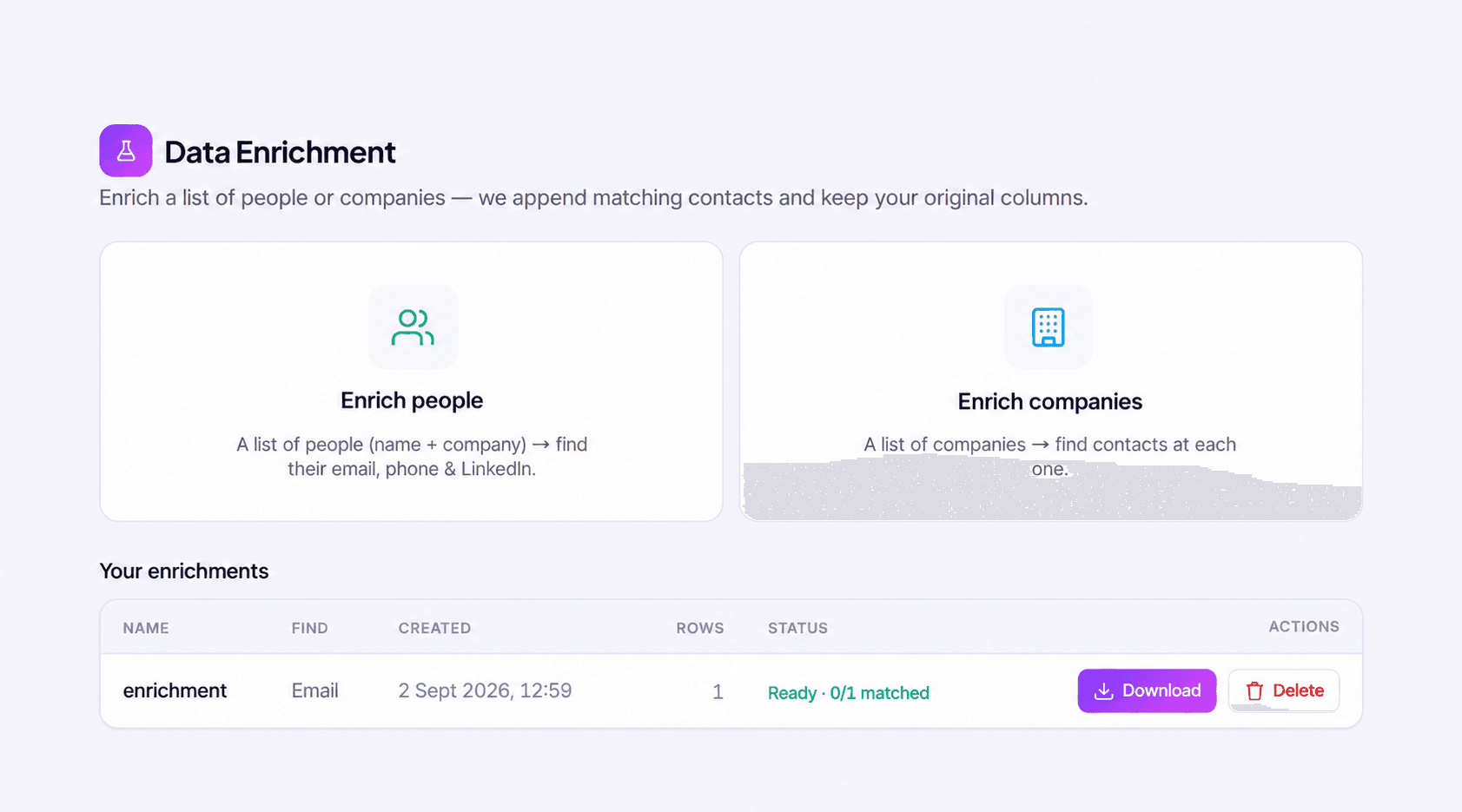
Bulkdata.ai enrichment workspace with people and company enrichment options and job status.
One place to choose your enrichment workflow and review completed jobs.

Features

Data infrastructure built for serious revenue operations

From CRM hygiene to bulk file enrichment — everything your RevOps and data teams need to maintain a clean, complete, and compliant data foundation.

  • Bulk Enrichment

    Upload a CSV or XLSX file and append verified emails, phones and firmographics to every row that matches. Credits are only charged for rows that match and return data.

    • CSV or XLSX upload
    • Match-rate preview
    • Append only what you need
    • Free CSV export
  • CRM Data Hygiene

    Verify and fill gaps in an export of your existing CRM records at scale. Upload the file, enrich the missing fields, then import the cleaned file back into your CRM yourself.

  • ICP & Lead Scoring

    Define your ICP model once and automatically score every inbound lead against it. Route high-fit leads to sales before they go cold.

  • AI Assistant Access

    Use the MCP server to let a compatible AI assistant search contacts and companies, enrich records and reveal details, with the same credits as the app.

  • Compliance & Privacy

    GDPR and CCPA compliant by design. Data processing agreements available. Opt-out suppression built into every export.

  • Data Quality Monitoring

    Track data coverage, freshness, and accuracy across every field in your CRM. Get alerted when data quality drops below your defined thresholds.

How It Works

Export, enrich, and re-import in four steps

Validate your field mapping with a representative sample before you run the full file.

  1. 01

    Export Your Records

    Export the records you want cleaned from your CRM or database as a CSV or XLSX file.

  2. 02

    Define Your Data Model

    Map your columns and choose which of the 50+ enrichment fields to append. Your original columns stay intact so the file re-imports cleanly.

  3. 03

    Run Enrichment at Scale

    Preview the match rate, then run the job on the full file. Credits are only charged for rows that match and return data.

  4. 04

    Review and Re-import

    Check coverage and accuracy across the appended fields, then download the enriched CSV for free and import it into your CRM.

CRM data quality

Plan a controlled CRM enrichment rollout

Revenue operations teams need to know which records changed, which values to keep and where the results will go. Start with a small, representative batch before expanding an enrichment workflow.

  1. Agree on record keys and field ownership

    Inventory the contact and company fields used for routing, segmentation and reporting. Choose the identifiers your destination uses to match existing records, and decide which system owns each field. Separate fields that should only fill blanks from values that may be refreshed. Keep internal ownership, lifecycle stages and other operational fields outside the enrichment scope unless deliberately mapped.

    Review contact and company fields
  2. Validate matches before expanding the job

    Use a sample containing complete, incomplete and potentially duplicated records. Check the match quality as well as the number of fields added. Review changed values against your mapping and retain the original record identifiers for reconciliation. Establish a review process for unmatched records instead of treating every missing value as a reason to create a new contact.

    Explore CRM enrichment workflows
  3. Choose a delivery method and measure the result

    Export the enriched file for import into your own system, or use the MCP server to work from an AI assistant. Plan how your system will avoid duplicate writes before loading larger runs. Measure field completeness, duplicate creation and routing exceptions against the initial sample, and keep a named owner for reviewing the ongoing results.

    Set up the B2B data MCP server

CRM enrichment questions for RevOps

Practical answers to help you evaluate the data and plan your workflow.

What is CRM data enrichment for revenue operations?

CRM enrichment adds contact and company context to existing records, such as job role, work email or firmographic fields. RevOps teams use that context for segmentation, routing and reporting. A controlled rollout defines the matching key and field ownership first, then checks a sample of results before increasing the volume of records processed.

How can I avoid overwriting useful CRM data?

Compare the exported file's columns with your CRM fields and choose which may be updated and which should only fill blanks. Keep record identifiers in the file and test complete as well as incomplete records. Check representative results with the team that owns the CRM before importing the file for a wider set of records.

STOP SETTLING FOR BLIND SPOTS

Start selling to the marketsyou've been missing.

Search people and companies, enrich records with verified emails and phones, and export clean data as a CSV.

Free credits to startNo credit cardFast setup