

Signal Types

11 B2B Buying Signals. One Platform.

Bulkdata.ai monitors 11 types of B2B intent signals across people movement, company events, record lifecycle and technology changes. Every signal tells you what fired, how fresh the data is, and delivers it straight to HubSpot, Salesforce or your CRM — so you act on buying intent the moment it happens.

  • Real-time updatesBe first to know
  • Actionable insightsFocus on what matters
  • More pipelineTurn signals into revenue
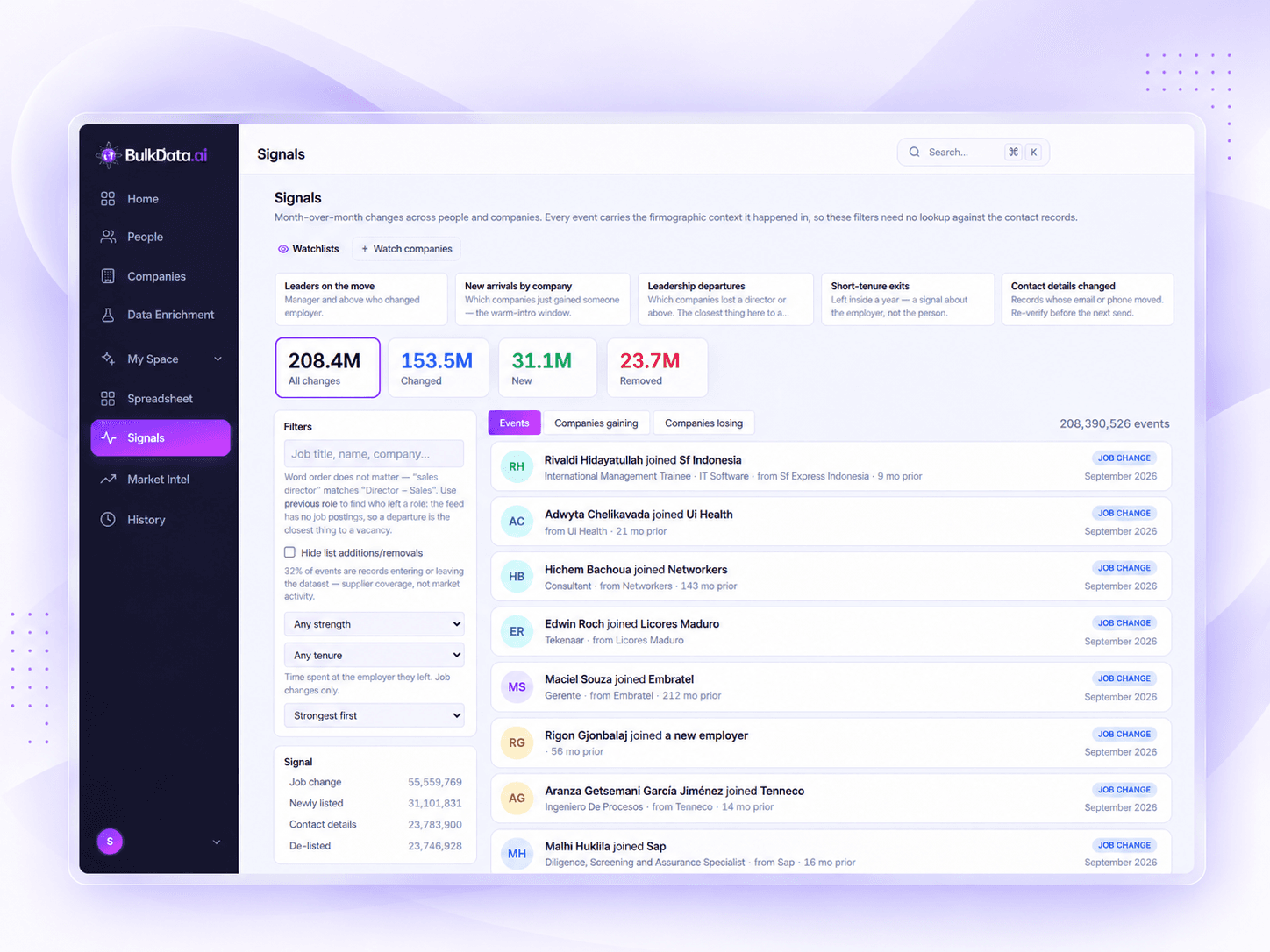
The Bulkdata.ai Signals screen: watchlist presets across the top, a filter rail on the left, and a feed of dated job-change events on the right.

The basics

What is a buying signal?

A signal is a dated, verified fact about a company that changes how worth contacting that company is right now. It is not a lead list, and it is not a score on its own — it is the event underneath the score, with its source and its detection date attached, so a rep can open with the actual reason they are calling rather than an invented one.

  1. Something happens

    A company posts twelve new roles, closes a round, swaps a tool, or hires a VP.

  2. We detect and verify it

    The event is picked up from its source, checked against a second one where one exists, and attached to the account with a detection date.

  3. It reaches you

    Scored against your ICP and delivered to your feed or your inbox.

What you can track

Every important signal,
in one place.

Track real-time people and company signals across the accounts you sell to — who moved, who joined, who left, and which companies are growing or shrinking. Spot opportunities weeks earlier, open with the reason you are calling instead of an invented one, build smarter outreach around what actually changed, and stay ahead of the way your market is moving.

  • Leaders on the move

    See when leaders are promoted, change roles, or take on new responsibilities.

  • New arrivals by company

    Get notified when new people join your target companies.

  • Leadership departures

    Track when key people leave, so you can spot hiring needs and new openings.

  • Short-tenure exits

    Identify people who leave within a short time at a company — a sign of change.

  • Contact details changed

    See when emails, phone numbers, or other contact details are updated.

  • Companies gaining or losing

    Track company growth and churn with real-time headcount changes.

You don't go looking — it comes to you. Name the accounts you care about once and every signal that fires inside that set reaches your feed or your inbox without anyone running a search. The six above ship as presets; a watchlist is any set of companies you choose, and a company can sit in as many as you like.
208.4MAll changes
153.5MPeople changed
31.1MNew to companies
23.7MRemoved from companies

Signal categories

A signal for every opportunity

Bulkdata.ai tracks millions of real-time changes across people and companies. Signals are grouped into categories so you can quickly find the insights that matter most to your business.

  • People movement

    Track talent. Find opportunity.

    New hires, role changes, promotions, departures and team growth across companies.

    Real-time to dailyBe first to know.
    • New hire
    • Leadership change
    • People leaving
  • Record lifecycle

    See what's new. Know what's next.

    New and updated company records, profile enrichments, and data changes across the dataset.

    Daily to weeklyAlways up to date.
    • New company added
    • Profile updated
    • Data enriched
  • Company events

    Spot momentum. Act faster.

    Funding rounds, M&A activity, IPOs, expansions, contractions, and other key business events.

    Real-time to dailyCatch momentum early.
    • Funding raised
    • Acquisition
    • New office
  • Technology

    See what they use. Find your edge.

    Technology adoption and usage signals from company websites, job postings and public data.

    Daily to weeklyStay ahead of change.
    • New tech adopted
    • Tool replacement
    • Cloud migration
  • Other

    Additional signals, broader coverage.

    Contact updates, location changes, website updates and other miscellaneous signals.

    Daily to weeklyA more complete picture.
    • Contact info changed
    • Website update
    • Office relocation
More signals. More opportunities.

The catalogue

Eleven signals. One page.

Colour-coded by family. Open any card for what fires it, how fresh it is, and what it looks like in the feed.

  • People movement

    Job change

    A tracked contact turns up at a different company. A champion who liked your product at their last employer is the warmest first line you will get.

    Freshness & example
    How fresh it typically is
    Typically within a day of the public profile change
    What it looks like in your feed
    Emma Whitfield left Vantify for Northbeam as Head of Ops.

  • People movement

    Role change

    An existing contact moves function inside the same company — useful for keeping your CRM’s champion and decision-maker fields honest.

    Freshness & example
    How fresh it typically is
    Typically within a day of the public profile change
    What it looks like in your feed
    Emma Roberts moved from Marketing to Revenue Operations.
  • People movement

    Promotion

    A contact moves up a level in the same organisation. Seniority is usually the difference between a contact who can recommend and one who can sign.

    Freshness & example
    How fresh it typically is
    Typically within a day of the public profile change
    What it looks like in your feed
    Emma Roberts promoted to Head of Revenue.
  • People movement

    Relocated

    A contact’s location changes — a different city, region or country. It re-routes territory ownership and it changes what time zone to call in.

    Freshness & example
    How fresh it typically is
    Typically within a day of the public profile change
    What it looks like in your feed
    Daniel Okafor relocated from Manchester to Dubai.
  • Record lifecycle

    Newly listed

    A person or company enters the index for the first time — a company that has just started publishing, or a contact who has just become visible.

    Freshness & example
    How fresh it typically is
    Appears on the crawl that first sees the record
    What it looks like in your feed
    Harborline Analytics entered the index this week.
  • Record lifecycle

    De-listed

    A record leaves the index — the company stopped trading, the profile was withdrawn, or the contact exercised a removal right. Worth knowing before you email it.

    Freshness & example
    How fresh it typically is
    Applied on the crawl that first misses the record
    What it looks like in your feed
    Corely Ltd was de-listed after ceasing to trade.
  • Record lifecycle

    Contact details

    A verified email or phone number on an existing record changes, is added, or fails re-verification. The single most common reason a working list stops working.

    Freshness & example
    How fresh it typically is
    Applied on the record’s re-verification cycle
    What it looks like in your feed
    A new verified direct dial replaced a dead one at Fenlow.
  • Company events

    Funding

    A new round is announced or filed — seed through late stage, including extensions and debt facilities.

    Freshness & example
    How fresh it typically is
    Typically within hours of the announcement or filing
    What it looks like in your feed
    Nexus SaaS raised a $12M Series A this week.
  • Company events

    Company growth

    Sustained expansion at the account — headcount climbing, offices opening, roles being opened across functions. Scaling operations, not just spending.

    Freshness & example
    How fresh it typically is
    Aggregated and refreshed daily
    What it looks like in your feed
    Orbit Tech grew headcount 24% and opened an Austin office.
  • Technology

    Tech change

    A tool in or adjacent to your category is detected on the account’s public web properties for the first time, or a previously detected one disappears from them.

    Freshness & example
    How fresh it typically is
    Detected on a recurring crawl, usually within days
    What it looks like in your feed
    Harborline dropped its Marketo tag and added HubSpot.
  • Other

    Other

    Any verified change on a tracked company or contact that does not map to one of the ten named types — a registry update, a rebrand, a status change.

    Freshness & example
    How fresh it typically is
    Follows the source’s own publication cycle
    What it looks like in your feed
    Brightbase filed accounts and changed registered address.

Market intelligence

How do teams use the signal feed?

Every signal in the catalogue is one movement by one person. Aggregate a month of them and you get something different: a map of where senior talent is flowing, by company and by industry.

Who is hiring ahead of the market

A company taking on senior people faster than its peers is usually funding something. That is a budget forming, months before it becomes a procurement process.

Who is shedding it

Sustained senior departures at an account say something its press releases will not. Useful for renewal risk on your customers, and for timing on everyone else.

Where a whole sector is moving

Filter to an industry and the same picture is a market read rather than an account read — which segments are absorbing people and which are letting them go.

Filter by month and by industry. Ranked both ways — the companies gaining senior people and the companies losing them — because which list an account sits on changes what there is to say to it.

How it reaches you

How do signals reach your team?

Get the right people the right signals, in the app or in their inbox. Flexible delivery options make it easy to turn insights into action.

  • In-app feed

    Explore and act on signals directly in Bulkdata.ai. Filter, save, and share with your team.

    Open your feed
  • Email digest

    Get a curated summary of the most relevant signals delivered to your inbox on your schedule.

    Set up email digest

How it works

How do you turn a signal
into a meeting?

Bulkdata.ai continuously monitors the web for people and company changes, enriches them with context, and helps you act on the right opportunities — faster.

  1. Define your ICP and choose filters

    Set your ideal customer profile and use powerful filters — like job change, leadership moves, company growth and more — to focus on what matters.

  2. Monitor real-time changes

    We track people and companies across the web, so you get fresh signals close to the moment they happen — not weeks later.

  3. Review enriched context

    See the full picture behind every signal — background, previous roles, company details and more — so you can prioritise with confidence.

  4. Act on opportunities

    Turn insights into pipeline. Get notified, export to CSV, enrich with additional data, and reach out to the right people at the right time.

Fit scoring

How does fit scoring work?

A signal on its own only says something happened. The score says whether it happened somewhere you sell.

You define the ideal customer profile — the firmographics, the titles and the territories you actually sell to. Every signal that fires is then scored against that definition rather than against a universal notion of a good company, which is why the same funding round can rank high for one workspace and be filtered out of another. Scores move as your ICP changes, and as your team marks accounts as worked or dismissed.

What goes into a score

  1. How closely the account matches the firmographics in your ICP — industry, size, region, business model
  2. Whether the people the signal concerns hold the titles and seniorities you sell to
  3. How recent the event is, and whether the same account has fired other signals around it
  4. The signal type itself, since some events matter far more to your category than others
  5. Your own history: the accounts your team has worked, won and explicitly dismissed

No published weighting. We would be inventing precision if we gave one — the relative importance is tuned per workspace as the model sees which accounts your team engages. Treat a score as a ranking of what to look at first, not as a probability of closing.

Signal questions

Got questions about Signals?

Everything you need to know about how Bulkdata.ai Signals works, from data freshness to setup, so you can buy and act on the right signals with confidence.

How quickly does a signal appear after the event?

It depends on how the underlying source publishes. Signals drawn from sources that publish continuously — professional profiles, job boards, funding databases — are typically detected and verified within hours of the source going live. Signals that depend on a source refreshed on its own daily cycle arrive on that cycle. Each signal type in the catalogue above carries the freshness we expect for it; treat those as typical behaviour rather than a service-level guarantee.

What sources are signals derived from?

Public and licensed sources: public professional-profile changes, funding and corporate-registry records, company career pages and hiring activity, and technology detection on public web properties. Every signal is verified against more than one source where a second source exists, and the record it attaches to carries the detection date. The exact source mix for a given signal type changes as sources are added or retired, so the catalogue describes what triggers a signal rather than naming a fixed vendor list.

Can I filter to only the signals I care about?

Yes, and most teams should. You can restrict a feed by signal type, by the account lists or saved searches you already keep, by firmographics such as industry, size and region, and by a minimum fit score. Filters apply to the in-app feed and to digests, so an alert you have filtered out of the feed will not reach your digest either.

Do signals cost credits?

No. Seeing a signal does not cost a credit. Browsing and filtering the feed is free in the same way that searching and filtering records is free, and credits are only spent when you reveal a contact. So acting on a signal by revealing the decision-makers at that account costs credits, while watching the account and reading the signal does not. You never pay twice for the same person: once a contact has been revealed, opening that record again is free, for good. Buying signals are included on every plan, including Free.

How far back does signal history go?

Each account carries a rolling history of the signals detected on it, so you can see whether this month’s company growth follows a funding round from earlier in the year. The length of that window depends on your plan and is still being finalised, so read the date range shown on the account’s signal timeline rather than assuming a fixed number of months.

How do I act on a signal?

Signals surface in the Bulkdata.ai feed, where you can filter them and work the accounts directly, or export the matching records as a file and run your own outreach from there. There is no automated push into a sequencing tool — you decide what happens next rather than the platform firing it for you.

Turn signals into opportunities

Start turning signals into pipeline today.

Join the teams using Bulkdata.ai to track changes, find the right buyers, and act at the right time.

  • See value fastLive in days, not months
  • Built for go-to-marketSales, marketing and RevOps
  • Turn signals into revenueFind and engage the right buyers