

Remote MCP Server
Verified B2B intelligence for your AI - Bulkdata.ai MCP
Access verified B2B intelligence for your AI workflows with BulkData.ai’s MCP integration. Search companies, identify decision-makers, and enrich contact data in real time. Empower AI agents with reliable business intelligence for smarter prospecting, research, and sales automation
No commands to learn
Describe what you want. The assistant picks the right tool and chains follow-ups on its own.
Three datasets, one endpoint
The first two answer who exists. The third answers who is worth contacting now.
390M+
People
Name, title, seniority, function, employer, location, verified email, direct dial, mobile, LinkedIn, skills.
Monthly
Change feed
Job moves, promotions, departures and record changes — who moved, from where, to what role.
Connect in under a minute
One endpoint for every client. Nothing to install, no API key to configure.
Before you connect: Bulkdata.ai works on any Claude or ChatGPT subscription, including free accounts. What governs your access is your bulkdata.ai account — your plan, permissions and allowance apply inside the assistant exactly as they do in the web app. If you can’t reach something in bulkdata.ai, the assistant can’t either.
Searching, counting and browsing the change feed are free and unmetered. Revealing a contact channel spends credits — see what costs what. You are quoted the exact cost and asked to confirm before anything is deducted.
https://tools.bulkdata.si/mcp- Open ClaudeSign in, or create an account. Works on web, desktop and Cowork.
- Go to Customize → ConnectorsFrom any chat.
- Find Bulkdata.aiOr add it as a custom connector with the URL above.
The connector as it appears in your list.
- Click Connect to ClaudeThe overview shows the connector URL and confirms sign-in is required.
Check the connector URL reads https://tools.bulkdata.si/mcp before connecting.
- Sign in with your bulkdata.ai credentialsOur own page opens and lists exactly what the assistant will be able to do. Enter your email and password, then click Allow.
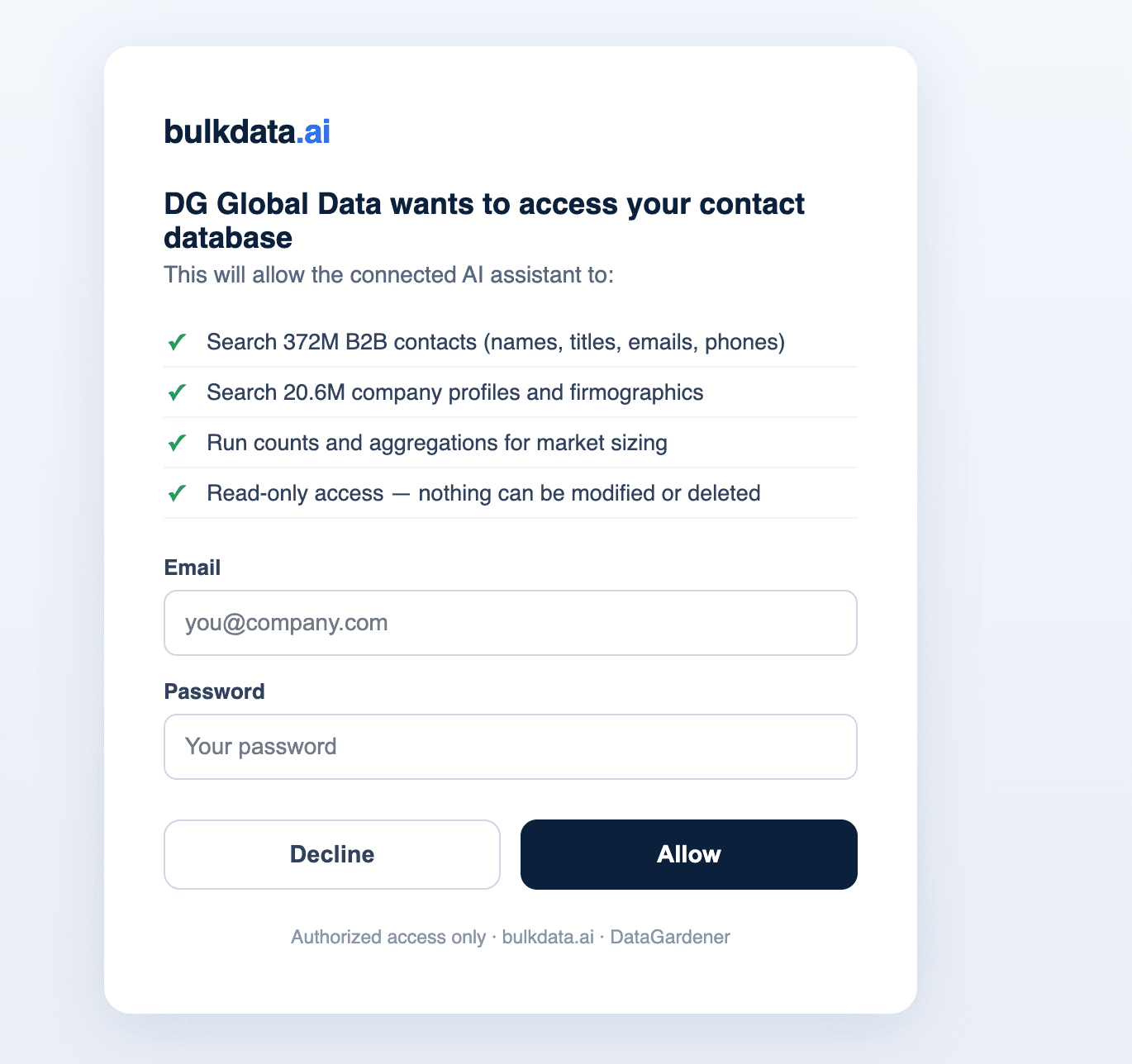
Claude never sees your password — sign-in happens on bulkdata.ai and returns a scoped token.
- Set tool permissionsChoose how much latitude the assistant gets per tool.Always allowRuns without asking. Sensible for search, counts and the change feed — they're free and read-only.AskPrompts you first. Recommended for Reveal Contacts, the one tool that spends credits.BlockThe assistant can't use it at all.
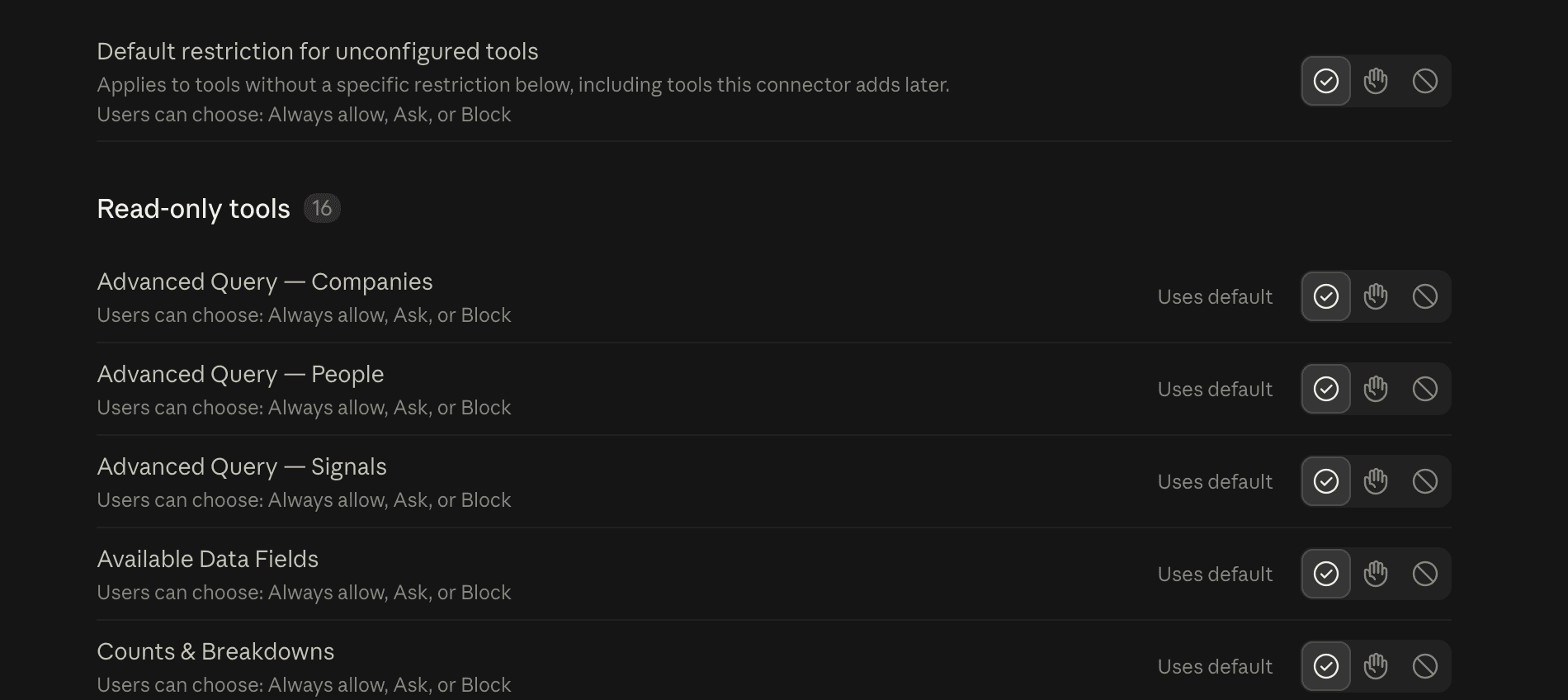
Set a default for all tools, or override individual ones.
- Start askingThat's it — describe what you want in plain English. The assistant picks the right tool, and will check with you if a request is ambiguous.
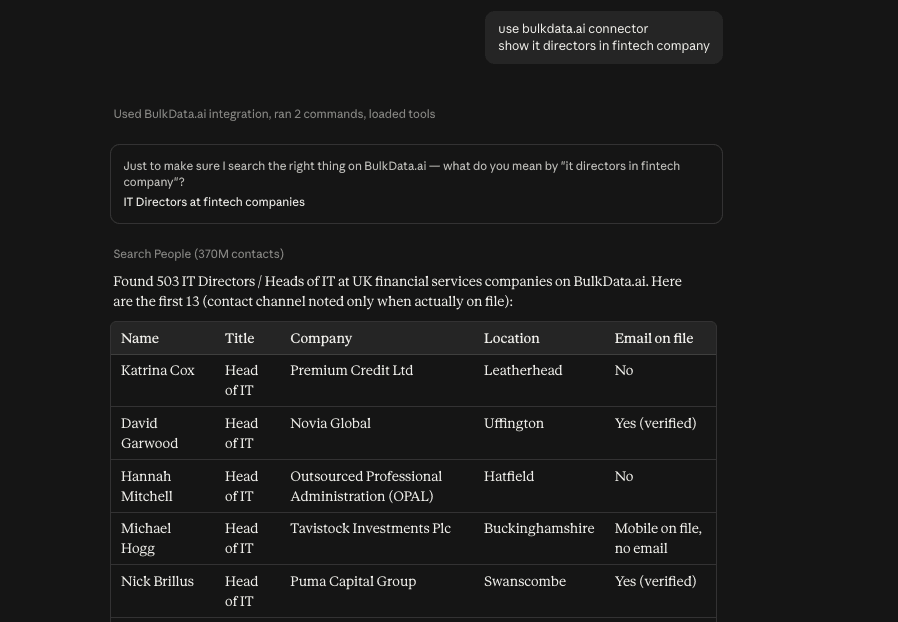
Contact channels are reported as on file or not — the values themselves stay masked until you ask to reveal them.

If the tools don’t appear straight away, restart the client and start a new chat.
Using a different assistant? The steps are near-identical — add the same URL as a remote MCP server and sign in when prompted. Your allowance and unlocked-contact history are shared across every client you connect, so a contact you unlock in one is already unlocked in the others. See supported assistants.
Finding is free. Revealing costs credits.
Contact channels arrive masked. Nothing is ever deducted without your confirmation.
Searching people, companies and the change feed · counts and market sizing · company records · saving and running watchlists · checking your balance · quoting a reveal
| Email address | 1 credit |
| LinkedIn profile | 1 credit |
| Phone number | 5 credits |
How a reveal works
- You're quoted the exact costHow many records, which channels, total credits, and your balance before and after.
- You confirmThe reveal will not proceed without an explicit yes.
- Only new records are chargedAnything you already own is shown at no cost and excluded from the total — permanently, across every client.
Supported tools
Every Bulkdata.ai action your assistant gets out of the box.
| Tool | What it does |
|---|---|
| Search & retrieveFree | |
describe_indexes | Every queryable field, its type and meaning, plus the join keys between datasets. Best first call for precise queries. |
search_people | Structured contact search by seniority, function, title, geography, employer attributes and contact availability. |
search_companies | Structured company search by industry, geography, headcount, revenue, founded year, funding, tech stack and hiring signals. |
people_at_company | Everyone at a given company by ID or domain, optionally narrowed by seniority, function or title. |
get_person | Full contact card for one person — title, employer, channels, LinkedIn, skills, education, location. |
get_company | Full record for one company — firmographics, funding summary, tech fields, hiring counts, traffic. |
aggregate_contacts | Exact bucket counts over any index without pulling records. Use this for market sizing. |
| Change feedFree | |
search_delta | Job moves, promotions and departures filtered by company, seniority, function, geography and signal strength. |
get_delta | Full detail for a single change record, including every individual field that changed. |
| WatchlistsFree | |
save_watchlist | Save a named set of accounts plus signal filters. Accepts domains, company names or IDs and resolves them for you. |
list_watchlists | Your saved watchlists, how many accounts each covers, and when each was last run. |
run_watchlist | Replay a watchlist against the newest snapshot and return matching signals, ranked by strength. |
delete_watchlist | Remove a saved list. No contact or company data is affected. |
| Credits & reveals | |
my_creditsFree | Your current balance and recent spend. |
quote_revealFree | Prices a reveal without charging — which records, which channels, total credits, balance before and after, and what you already own. |
reveal_contactsCredits | Unlocks contact channels after you confirm the quote. Refuses to run without explicit confirmation; never charges twice for the same record. |
| AdvancedFree | |
query_people_raw | Raw Elasticsearch query body against the person index — nested bools, collapse-by-company, deep pagination. |
query_companies_raw | Raw query body against the company index — multi-level aggregations and complex boolean logic. |
query_delta_raw | Raw query body against the change feed — nested queries over individual field changes. |
Raw tools are read-only, size-capped and pinned to their index. Results pass through the same masking as every other tool — raw access does not bypass credits.
Use Bulkdata.ai with your AI assistant
Every client points at the same endpoint and shares the same account, allowance and unlocked-contact history.
- ClaudeWeb, desktop, Cowork and Claude Code
- ChatGPTConnectors, or Developer mode on some plans
- GeminiAdd as a remote MCP server
- GrokAdd as a remote MCP server
- CursorMCP settings, or mcp.json


Don’t see yours? Bulkdata.ai is a standard remote MCP server with no client-specific behaviour — VS Code, Windsurf and any other client that accepts a remote MCP URL will work the same way. If one is blocked at sign-in, send us its name and we’ll allowlist it.
Key filters
People
| Seniority | C-Team, VP, Director, Manager, Staff |
| Geography | Country, ISO code, region, state, city |
| Contactability | Has email / verified / direct dial / mobile |
| Employer | Name, domain, industry, headcount, revenue |
| Title | All-words, or any of up to 20 phrases |
Companies
| Headcount | 1–10 through 10,001+ |
| Revenue | <$1M through $1B+, or explicit min/max |
| Funding | Last type, last date, total raised |
| Technographics | Technology categories in use |
| Hiring | By function, with a minimum open-roles threshold |
| Classification | LinkedIn industry, NAICS, SIC |
Change feed
| Signal type | Job change, promotion, departure, record update |
| Period | YYYY-MM, or just say "last month" / "the last 90 days" |
| Who | Seniority, function, country — same vocabulary as the person index |
| Where | Current company, or previous company for departures |
Common questions
Setup errors, masked contact channels, and how a shared team account works across clients.
The tools don’t appear after setup
Confirm the connector is toggled on for the current chat. On desktop clients, fully quit and reopen — closing the window isn’t enough.
I’m getting “Not authenticated” or 401
Your session expired or was revoked. Remove the connector and reconnect to sign in again.
I’m getting “Not entitled” or 403
Your account doesn’t have Bulkdata.ai enabled, or the subscription has lapsed. Contact support@bulkdata.ai.
I see “redirect_uri not allowed” when connecting
The client you’re connecting from isn’t on our allowlist yet. Send us the client name and we’ll add it — usually same-day.
Contact details show as j•••@acme.com
That’s expected. Channels stay masked until you explicitly ask to reveal them and confirm the credit cost.
A broad search returned nothing
Industry and classification values are often semicolon-joined — pass a partial name (“Banking”) rather than the full string. Asking the assistant to check available fields first usually fixes it.
Counts look inconsistent between answers
Search totals are approximate on very large result sets. Ask for a breakdown instead — aggregations return exact figures.
Can my whole team connect?
Yes. Each person signs in with their own bulkdata.ai account. The credit allowance is shared across the account, and unlocked contacts are shared too — so two people revealing the same record only pay once.
Can I connect more than one AI assistant?
Yes, at no extra cost. Connect Claude, ChatGPT, Grok and your editor simultaneously — they all draw on the same account and share the same unlocked history.
STOP SETTLING FOR BLIND SPOTS
Start selling to the marketsyou've been missing.
Search people and companies, enrich records with verified emails and phones, and export clean data as a CSV.